
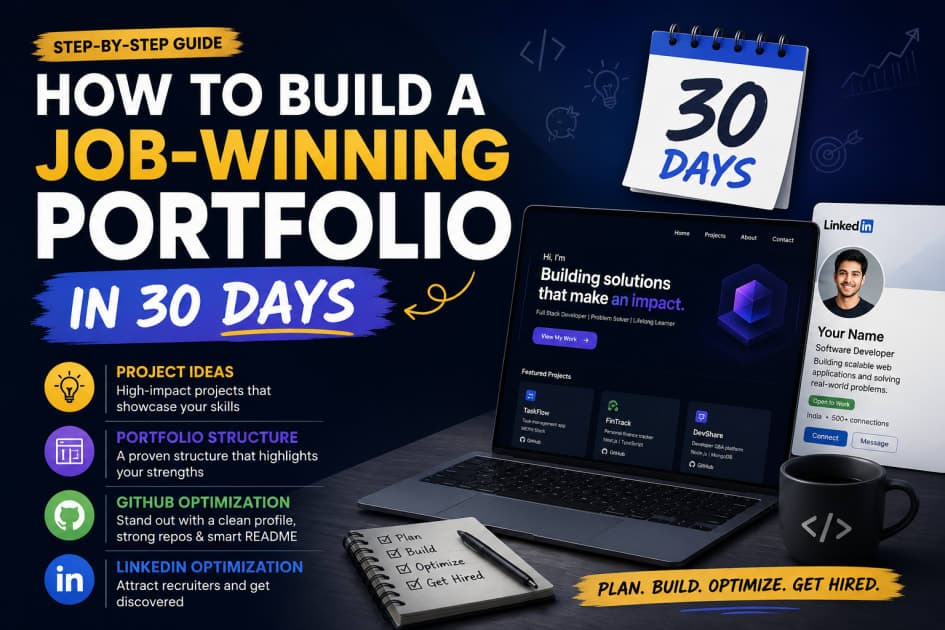
Final year is winding down and your resume still has nothing on it but a CGPA you'd rather not discuss? You're not alone — most engineering students graduate with a transcript and zero proof they can actually build something. Here's the truth: recruiters don't hire transcripts, they hire portfolios. This guide shows you exactly how to build a job-winning portfolio in 30 days — the project ideas to pick, how to structure the site, and the GitHub and LinkedIn moves that get recruiters to actually click.
Why a Portfolio Beats Your Resume Every Time
A portfolio is proof — live projects, real code, and write-ups that show what you can do, not just what you studied. Your resume makes claims. Your portfolio backs them up.
Here's why it matters more than another resume rewrite:
Off-campus hiring runs on proof, not pedigree. Recruiters at startups like Razorpay, Zerodha, and Freshworks filter by what you've shipped, not which tier your college falls into.
It survives the CGPA filter. A 6.5 CGPA next to three solid, deployed projects reads very differently than a 6.5 sitting alone on a resume.
It answers the interview question before it's asked. A working app or dashboard does your talking for you in the first 30 seconds of a screen share.
It's how recruiters actually find you. On LinkedIn and Unstop, a portfolio link in your profile gets you discovered through search — your college placement cell isn't the only door anymore.
You don't need ten projects or a design degree to pull this off. You need a focused 30-day plan — which is exactly what this guide gives you.
Step 1: Pick Project Ideas That Actually Get You Hired (Days 1–10)
Most student projects are forgettable — another to-do list app, another calculator, another Netflix clone with no backend. Recruiters have seen all three a thousand times. Build something that proves you can solve a real problem instead.
Project Ideas by Track
Web Development
A full-stack expense tracker with a clean, dashboard-style UI — React + Node.js + PostgreSQL
A campus marketplace or lost-and-found app built specifically for your college — solves a real, local problem
A payment flow simulator built on a sandbox API (Razorpay and Stripe both offer test environments)
Mobile / App Development
A regional-language fee-reminder or attendance app aimed at school teachers, not just students
A canteen pre-ordering app for your own college — pitch it to your canteen committee for bonus credibility
Data Science / ML
A placement-prediction model trained on your own college's last three years of placement data
A resume/ATS-score checker that scans a resume against a job description and flags missing keywords
Backend / Systems
A URL shortener with rate limiting, redirects, and click analytics — a classic system design fundamental
A mini food-delivery backend with order tracking and webhook-based status notifications
What Makes a Project Resume-Worthy
It solves a real problem — even a small, local one counts
It has a live, working demo link, not just a code repo
It uses at least one tool or stack mentioned in the job descriptions you're targeting
It has a README that explains the "why," not just the "what"
Mistakes to Avoid
Starting five projects and finishing none of them
Skipping deployment — a project that "only runs on my laptop" doesn't count
Copy-pasting a tutorial project without adding your own twist
Pro Tip: Pick at least one project that solves a problem specific to India — regional language support, UPI-style payment flows, low-bandwidth design for tier-2/tier-3 users. Recruiters notice when you've thought about your own market instead of cloning a US tutorial.
If you're short on ideas, browsing live problem statements on Unstop hackathons or recent community discussions is a faster way to find a real gap than brainstorming alone.
Step 2: Structure a Job-Winning Portfolio Recruiters Actually Read (Days 11–15)
A recruiter spends under a minute deciding whether your portfolio is worth a second look. If they have to hunt for your best work, you've already lost them.
What to Include, In This Order
Hero section — your name, the role you're targeting, and a one-line pitch
2–3 featured projects — live demo link, GitHub link, and a two-line problem/solution summary for each
Skills section — grouped by category, not a wall of random tags
Resume + contact — downloadable resume, LinkedIn, GitHub, email
About (optional) — two or three lines on your story, if it adds context
Section | What Goes Here | Why It Matters |
|---|---|---|
Hero | Name, target role, one-line pitch | Sets context in the first five seconds |
Featured Projects | 2–3 best projects with live demo + GitHub + problem solved | This is what recruiters actually read |
Skills | Grouped by Languages, Frameworks, Tools | Scannable at a glance |
Resume + Contact | PDF resume, LinkedIn, GitHub, email | Makes it easy to act on interest |
About (optional) | 2–3 lines on your story | Humanizes you — not mandatory |
You don't need to build a portfolio site from scratch if you're short on time — Vercel and Netlify both let you deploy a free template-based site in under an hour. But coding your own, even from a starter template, doubles as another project for your portfolio page.
Key Tip: Use this table to audit your current portfolio (or draft) before moving to GitHub and LinkedIn — if any row is missing, fix it before you build more projects.
Pro Tip: Don't list every project you've ever built. Three strong, deployed projects beat ten half-finished repos — recruiters judge your best work, not your total output.
Step 3: Optimize Your GitHub Profile So It Sells You (Days 16–22)
Your GitHub is the second tab a recruiter opens after your portfolio link — and a profile cluttered with fifty empty repos kills your credibility fast.
Profile-Level Fixes
Add a profile README — GitHub lets you create a special repo matching your username that displays as your profile page
Pin your 4–6 best repos, not your oldest or most random ones
Use a real, clear profile photo — not a default avatar
Repo-Level Fixes
Every pinned repo needs a README with: what it does, the tech stack, a live demo link, setup instructions, and a screenshot or GIF
Your commit history should look real — small, regular commits, not one giant "final project" dump
Archive or delete abandoned tutorial-follow-along repos that add noise
Checklist before you move on:
[ ] Profile README added
[ ] Bio includes your target role and portfolio link
[ ] 4–6 pinned repos, each with a live demo
[ ] Every README has a screenshot or GIF
[ ] No "test" or "untitled" repo names visible on your profile
Pro Tip: Recruiters skim your GitHub contribution graph the same way they skim a resume. Commit something small every few days during your 30-day sprint — a green graph with steady activity reads better than one massive commit dump the night before you apply. GitHub's own profile README guide walks you through the setup in ten minutes.
Step 4: Optimize LinkedIn So Recruiters Find You First (Days 23–28)
Recruiters at companies from Infosys to early-stage product startups search LinkedIn by keyword before they ever open your resume. If your profile doesn't speak that language, you're invisible to search — no matter how good your projects are.
Profile Elements to Fix
Headline: Skip "Student at XYZ College." Use something like "Aspiring Full-Stack Developer | React, Node.js, PostgreSQL | Building [your flagship project]"
About section: 3–4 lines, problem-solution-impact style, with a link to your portfolio
Featured section: Pin your top two projects, any certificates, and articles if you've written any
Experience: If you have no internship, list your strongest personal project here too — labeled clearly as a self-directed project, not disguised as a job
Skills: Add 10+ relevant skills and get a few endorsements from peers or mentors
Activity That Gets You Noticed
Post once or twice during your 30 days about your build process — what you learned, not just a launch announcement
Comment thoughtfully on posts from people at companies you're targeting
Connect with alumni from your college who are now working at companies on your list
Pro Tip: Turn on "Open to Work" but set visibility to recruiters only, not your full network. It still puts you in recruiter search filters without the public banner that can read as desperation to your peers.
Your 30-Day Portfolio Sprint at a Glance
Days | Focus | Deliverable |
|---|---|---|
1–3 | Pick your track, finalize 2 project ideas | Two validated project briefs |
4–10 | Build and deploy project 1 | Live demo + GitHub repo with README |
11–15 | Build and deploy project 2, structure portfolio site | Live portfolio site (Vercel/Netlify) |
16–22 | GitHub profile optimization | Profile README, pinned repos, clean commit history |
23–28 | LinkedIn optimization + 1–2 posts | Updated headline, About, Featured section |
29–30 | Final review, share for feedback, start applying | Portfolio, GitHub, and LinkedIn live + first applications sent |
Frequently Asked Questions About Building a Portfolio in 30 Days
Can I build a job-winning portfolio in 30 days with zero internship experience?
Yes — most freshers without internships get hired off the strength of personal projects, not work history. Two or three deployed, well-documented projects can carry your portfolio on their own, as long as they solve a real problem and aren't tutorial copies.
How many projects do I actually need in my portfolio?
Two to three polished, deployed projects beat ten unfinished ones. Recruiters judge your best work in the time they spend on your page, so depth and finish matter far more than quantity.
Should I use a portfolio builder or code my own site?
Either works for a fresher application. Coding your own — even from a free template — doubles as an additional project you can talk about in interviews, so it's worth the extra few hours if your timeline allows it.
What if my project idea has already been done by someone else?
That's almost guaranteed, and it's fine. What makes a project yours is the specific problem you're solving and the twist you add — a regional-language feature, a niche use case, or a dataset specific to your own college or city.
Is GitHub or LinkedIn more important for getting noticed?
They serve different purposes, so you need both. LinkedIn is where recruiters discover you through keyword search; GitHub is where they verify you actually wrote the code once they're interested.
Do I need a custom domain for my portfolio?
No. A free subdomain from Vercel or Netlify works fine at the fresher stage — recruiters care about what's on the page, not the URL it sits on. A custom domain is a nice upgrade later, not a requirement now.
Conclusion: Your Portfolio Is the Proof — Start Building It Today
Here's the bottom line: stop polishing your resume for the tenth time and start shipping proof instead.
Start with what you can control today:
Pick your track and lock in two project ideas right now
Block two hours a day for the next ten days to build and deploy project 1
Add a GitHub profile README before this week ends
Rewrite your LinkedIn headline and About section tonight
Share your portfolio link with a couple of mentors or seniors for feedback
Apply to your first 10 roles the day your portfolio goes live
Every rejected application is data, not a verdict. Each project you ship and each green square on your GitHub graph makes the next "no" harder to ignore.